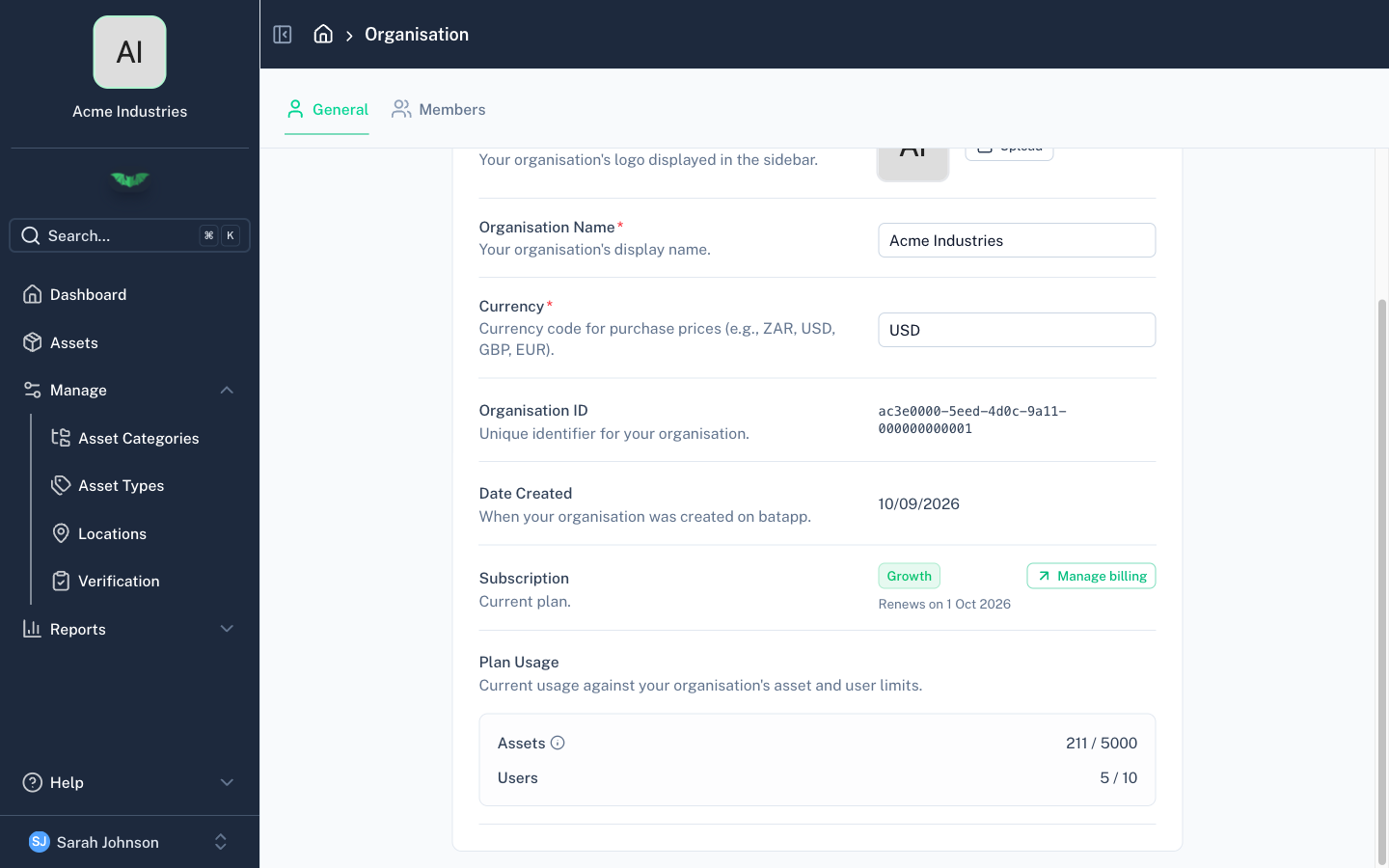
Organisation Settings
Organisation Settings
Organisation settings control how batapp behaves for your entire organisation. Only Admin and Support roles can access settings.
General Settings
Organisation Name
The name displayed throughout the app and on reports.
Logo
Upload your organisation's logo. It appears in the app header and on PDF reports. Supported formats: PNG, JPG, SVG.
Currency
Set the currency used for purchase prices and financial fields (e.g. ZAR, USD, GBP, EUR). This is a display setting — it determines the currency symbol shown alongside monetary values.
Subscription
View and manage your current subscription plan. Admins can upgrade, downgrade, or manage billing from this section.
The subscription section shows the current plan, status, next payment date, and billing amount when an active subscription is present.
Plan Usage
This section shows your current usage against the limits included in your organisation's active subscription.
- Assets — How many assets you currently have compared with your plan limit
- Users — How many members are currently in the organisation compared with your plan limit
If a limit is unlimited, batapp shows that instead of a capped number.
When your usage is getting close to a limit, batapp shows a warning. If you have reached a limit, batapp shows an alert explaining that you need to remove items or upgrade before adding more.
If plan limits are not enabled for your organisation yet, batapp shows a message indicating that plan limits are not currently active.